


gRDV Messages
Features
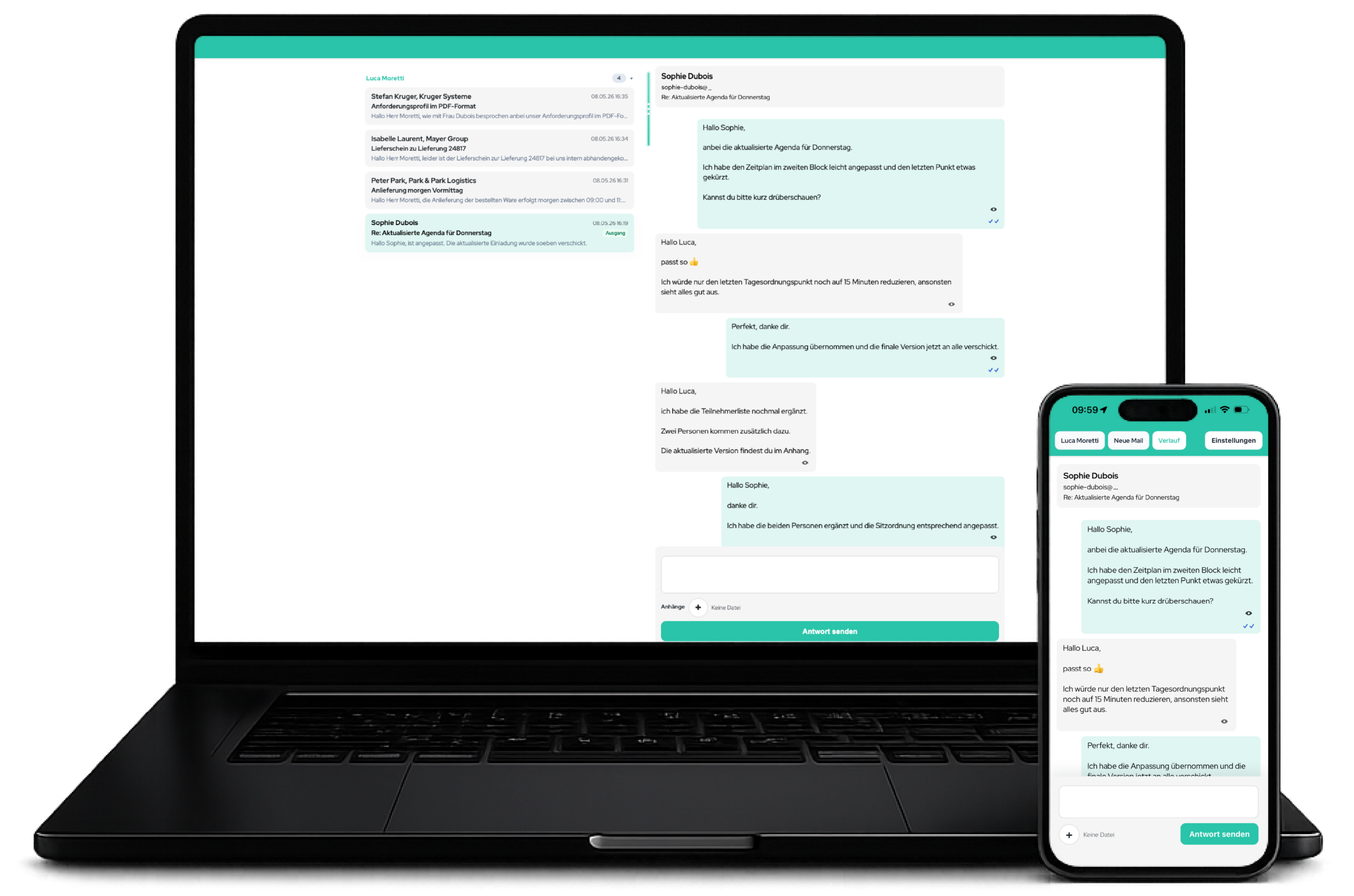
Central templates, signatures, typography, logo and colours for professional business email on every device
Reply to customer email directly from the conversation, using an automatic template and centrally managed signature
Incoming and outgoing messages organised as clear threads with attachments, status and history
Any number of mailboxes, senders, user assignments and mailbox filters.
Different templates and signatures for brands, departments or use cases.
Compose email in WordPress Admin or on mobile, with recipients, CC, BCC, attachments and a sending account
Use the inbox, conversations, new messages and replies on mobile without compromising a consistent email presence
Retrieve existing mailboxes through IMAP and send email through existing accounts using SMTP
Near-live, focus boost, burst, WordPress Cron, an external cron URL and sync recommendations.
Push notifications and an optional persistent IMAP IDLE worker on suitable servers.
Professional email presence for businesses
gRDV Messages ensures that business email has a consistent, on-brand and professional appearance. Its primary value is not SMTP itself, but consistent business communication across desktop computers, laptops, tablets and smartphones.
Capabilities:
- Central email design for new messages and replies
- Consistent templates and signatures
- Consistent font sizes and line heights
- Configurable logo, colours, borders, radii and backgrounds
- Responsive display for mobile devices
- Professional email appearance regardless of the device used by the team member
- Suitable for customer communication, support, bookings and internal workflows
E-Mail-Design, Templates & Branding
The plugin renders outgoing messages in a central HTML email layout. Businesses can manage the visual framework of their email directly in WordPress.
Features:
- HTML email template with its own wrapper
- Content card with an accent colour
- Logo in the email header
- Align the logo left, centre or right
- Maximum logo width
- Logo spacing at the top, right, bottom and left
- Optional subject line in the email body
- Primary and accent colours
- Body background colour
- Outer and inner borders
- Border colours and widths
- Adjustable corner radius
- Shadow intensity
- Content width from 420 to 1,400 px
- Template preview in Admin
Typeface & Typography
gRDV Messages centrally manages typography to deliver a consistent appearance across different devices and interfaces.
Features:
- Adjustable font size from 12 to 20 px
- Adjustable line height from 1.4 to 1.9
- Separate font contexts for:
– Email template
– Mobile web app
– Original email view - System font
- Theme font
- Plugin fonts
- Custom font stack
- Local font files included with the plugin
Included plugin fonts:
- Roboto
- Open Sans
- Lato
- Montserrat
- Red Hat Display
- Noto Sans
Responsive display on desktop and mobile devices
gRDV Messages accounts for mobile display directly in the email template. This keeps the layout readable and controlled even on smaller screens.
Features:
- Responsive viewport metadata
- Mobile CSS rules
- Content width scales on small viewports
- Adjusted padding on mobile devices
- Mobile corner-radius adjustments
- Mobile signature spacing
- Optimised display for smartphones
Signature management
Signatures are managed centrally and automatically included in outgoing email. A separate signature is also available for subsequent replies.
Features:
- Fallback signature
- Subsequent-reply signature
- Visual WordPress editor
- HTML/text mode
- Signature preview
- Table-based HTML signatures supported
- Automatic alignment normalisation
- Signature area outside the main content card
- Signatures by template profile – Pro
Especially useful:
- Full signature for initial contact
- Reduced or no signature in subsequent replies
- Consistent signature standards for teams
Reply templates & Placeholder
Replies can be structured using central templates. Placeholders ensure that personal data is inserted automatically.
Features:
- Fallback reply template
- HTML template editor
- Template-Vorschau
- Automatic token replacement
- Normalisation of line breaks
- Protection against invalid nested paragraphs
- Multiple template profiles – Pro
Available tokens:
{{message}}{{contact_name}}{{first_name}}{{last_name}}{{contact_first_name}}{{contact_last_name}}{{contact_email}}{{from_name}}{{from_email}}{{subject}}{{site_name}}
Compose new email
gRDV Messages does more than reply to email. The plugin includes a dedicated feature for composing new messages directly in WordPress and in the mobile web app.
Features in WordPress Admin:
- New-message page
- Recipient name
- Recipient address
- Multiple recipients separated by commas, semicolons or line breaks
- CC
- BCC
- Sending-account selection
- Subject editor
- WordPress message editor
- Attachments
- Context fields for integrations
- Send using the central gRDV Messages design
Mobile features:
- New message in the mobile web app
- Select a sending account
- Enter a name and recipient
- CC and BCC
- Subject
- Message
- Attachments
- Send in the gRDV Messages layout
Replies & message history
Email can be answered directly from existing conversations. gRDV Messages uses Message-ID, In-Reply-To and References so replies are sent as a technically correct conversation thread.
Features:
- Reply from an Admin thread
- Reply from the mobile web app
- Automatic reply template
- Automatic signature selection
- Attachments in replies
- Reply-To handling
- References header
- In-Reply-To header
- Custom Message-ID
- Avoid replies to the sender’s own address
- Save outgoing messages in the conversation history
- Optional filing in the IMAP Sent folder
Conversations, Inbox & Contacts
gRDV Messages organises communication into contacts, threads and messages, keeping customer conversations clear and traceable.
Features:
- Central inbox in WordPress Admin
- Compact inbox view
- Thread list
- Thread detail view
- Contacts
- Incoming messages
- Outgoing messages
- Unread counter
- “Incoming” and “Reply” status
- Contact name and email
- Subject display
- Preview text
- Date and time
- Mailbox filters
- Folder filters
- Mark messages as read/unread
- Delete messages
- Delete threads
- Orphan cleanup for unreferenced email data
Attachments & Files
The plugin supports attachments in new messages, replies and imported messages. Files are stored locally in the WordPress uploads area.
Features:
- Multiple attachments
- Attachments when composing new messages
- Attachments in replies
- Store incoming attachments
- Store outgoing attachments
- File name
- MIME-Type
- File size
- Download/inline URLs
- Mobile attachment display
- Resolve inline CID images
- Visibility filters for embedded attachments
Delivery status, opens & tracking – Pro
Pro can process technical feedback for sent messages and display it in the conversation history. Subject to availability from the email server, this includes delivered, bounced, deferred and failed signals. Optional open tracking is enabled only for individual recipients with consent documented in the plugin.
Delivery and opens cannot be detected reliably for every provider and email client. Image blocking, proxy caches and missing server feedback can affect the displayed status.
Features:
- Tracking token for each outgoing message
- Open pixel
- Tracking URL
X-GR-Mail-TrackHeader- Delivery status
- Open status
- Bounce detection
- Deferred detection
- Failed detection
- Process incoming delivery/feedback messages
- Tracking badges in the conversation history
Note:
Open and delivery tracking has privacy implications and should be documented transparently for the specific setup.
IMAP retrieval
gRDV Messages retrieves existing mailboxes through IMAP and imports messages into the conversation structure.
Features:
- IMAP-Host
- IMAP-Port
- SSL / TLS / no encryption
- IMAP username
- IMAP password
- Inbox folder
- Sent folder
- PHP IMAP availability check
- Retrieve active accounts
- Retrieve an individual account
- Sync state by account and folder
- Detect new UIDs
- Import incoming messages
- Reconcile deleted messages
- Error messages in sync status
SMTP sending
SMTP is included as a technical sending option. It is not the product’s primary positioning, but adds controlled sending through existing email accounts to gRDV Messages.
Features:
- SMTP-Host
- SMTP-Port
- TLS / SSL / no encryption
- SMTP username
- SMTP password
- PHPMailer configuration
- UTF-8
- HTML email
- Plain-text alternative
- Sender name
- Sender email
- Reply-To
- CC and BCC
- Attachments
- Envelope sender through a filter
- Evaluation of sending errors
Sent folder & mailbox consistency
After sending, gRDV Messages can attempt to file the message in the IMAP Sent folder. This keeps the conversation traceable in the existing mailbox as well.
Features:
- Configurable Sent folder
- Automatic candidates for common Sent folders
- Support for common folder names:
– Sent
– Sent Items
– Sent Messages
– Sent
– Sent Items
– Gmail / Google Mail variants - Folder detection through IMAP
- Cache for the detected Sent folder
- Warning if filing does not work
Mobile web app
The mobile web app brings gRDV Messages to smartphones and tablets. It is particularly valuable because mobile replies continue to use the central email design.
Features:
- Mobile inbox
- Mobile thread list
- Group by mailbox
- Mobile thread view
- Mobile new-message view
- Mobile reply feature
- Reply dock
- Add attachments on mobile
- Select a sending account on mobile
- CC and BCC on mobile
- Private reply in multi-person threads
- Mobile contact overview
- With Pro: mobile delivery, bounce and open signals
- Mobile original-email view
- Mobile signature/quote cleanup for a compact display
- Magic URL
- Login link
- Token regeneration
- App icon
- Manifest
- Pro: service-worker structures
Mobile Design & UX
The mobile interface can be visually customised. This allows both the email itself and the mobile workspace to align more closely with the brand.
Features:
- Mobile primary colour
- Mobile accent colour
- App background
- Thread card colours
- Active card colours
- Border colours
- Conversation header colours
- Notification bubble colours
- Incoming bubble
- Outgoing bubble
- Pull/sync indicator
- Chip radius
- Card radius
- Button/input radius
- Card shadow
- Optional gloss effect
- Preset Arctic: Free
- Pulse, Mono and Frost presets: Pro
- Save, load and delete custom presets: Pro
Push & Near-live sync
Near-live, focus-boost and burst synchronisation are already included in Free and update the open web app at configurable intervals. Pro adds web push notifications when the web app is not open in the foreground.
Features:
- Near-live sync
- Focus boost
- Burst sync
- Configurable intervals and burst duration
- Pro: Web-Push-Benachrichtigungen
- Pro: encrypted VAPID keys
- Pro: device-specific push subscriptions
- Pro: push for new messages
- Pro: Badge-Synchronisierung
Free: external cron URL & sync stability
For professional hosting setups, gRDV Messages can be synchronised through an external cron URL. Additional safeguards support stable sync runs.
Features:
- External sync cron URL
- Sync token
- Token regeneration
- External sync trigger
- Lock to prevent parallel runs
- Cooldown to prevent calls in rapid succession
- Sync metrics
- Load monitor
- Sync recommendations
- Profiles such as “Near push”, “Balanced” and “Stable”
Free: multiple mailboxes
gRDV Messages Free already supports any number of mailboxes, each with its own IMAP, SMTP and sender details.
Features:
- Multiple active mailboxes
- Account label
- Custom sender address
- Custom sender name
- Custom Reply-To
- Custom IMAP details
- Custom SMTP details
- Enable/disable account
- Synchronise an individual account
- Synchronise all active accounts
- Assign users by account
- Delete account
- Manage mailboxes across different domains
Pro: template profiles
Template profiles enable different communication styles by account, brand, department or use case.
Features:
- Multiple template profiles
- Profile name
- Active/inactive
- Default profile or fixed assignment to selected mailboxes
- Apply to selected accounts
- Fixed profile assignment at account level
- Custom reply template
- Custom signature
- Custom subsequent-reply signature
- Automatic profile selection when sending
Free: User, Roles & Access
gRDV Messages uses WordPress permissions and extends them with account assignments for mobile use.
Features:
- Administration restricted to users with WordPress administrator permissions
- Mobile access control
- User assignment by mailbox
- Account scope for mobile users
- Permitted mobile roles:
– Administrator
– Editor
– Author
– Contributor
– Staff member - Roles customisable through filters
- Magic link for administrator context
- Login link for users
Free: gRDV Booking integration
When a compatible version of gRDV Booking is active on the same WordPress installation, gRDV Messages can recognise booking contexts and display the relevant links.
Features:
- Recognition of booking contexts
- Booking threads
- Booking ID
- Email-type recognition
- Customer-recipient recognition
- Booking summaries
- “Open in gRDV Booking” link
- Replies in the booking context
- Associate self-notification messages with the customer contact
- Map administrator subjects to customer subjects
Free: multi-folder mode
The inbox is not the only folder supported. Other folders can also be enabled for synchronisation or solely for filing.
Features:
- Multi-folder sync
- Folder detection
- Folder sync selection
- Folder visibility in the web app
- Account-folder table
- Message-remote table
- Inbox
- Sent
- Drafts
- Archive
- Trash
- Spam / Junk
- Remote actions
- Move
- Trash
- Permanent deletion
- Local cleanup of disabled folder data
Privacy Policy & Control
gRDV Messages runs within the WordPress installation and connects to existing email accounts. It is not an external SaaS email client; it uses the hosting provider’s or email provider’s existing infrastructure.
Features and considerations:
- No separate SaaS inbox
- Uses existing IMAP/SMTP accounts
- Plugin data in WordPress
- Dedicated database tables
- Local attachments in the uploads directory
- Token-based mobile access
- Regenerable tokens
- Secrets encrypted with OpenSSL
- Pro: push subscriptions and browser-dependent push services
- Pro: licence validation through the gR licence server
- Pro: tracking and consent data
Privacy-relevant data:
- Contacts
- Messages
- Attachments
- Email headers
- Delivery status
- Open status
- Push subscriptions
- IMAP/SMTP credentials
- Licence data
Internationalisation
The plugin is translation-ready.
Features:
- Textdomain
grdv-messages - Domain Path
/languages - Translatable UI text
- German default text in the code
- WordPress i18n functions
Admin areas
gRDV Messages provides its own Admin structure.
Menu items:
- Overview
- Inbox
- New message
- Template
- Design
- Mailbox
- Settings
- Pro: template profiles
- Pro: Export/import
- Pro: Licence
Admin features:
- Status overview
- Thread and message count
- Last sync
- Last run
- Sync status
- Manual retrieval
- New message
- Open inbox
- Settings pages
- Design preview
- Licence status
- Dismissible notices
System requirements & technical base
gRDV Messages is built on WordPress standards and established email protocols.
Requirements:
- WordPress 6.2 or later
- PHP 8.1 or later
- PHP IMAP for retrieval, folder synchronisation and email-server actions
- OpenSSL for stored email passwords, encrypted attachments and Pro web push
- A working WordPress Cron or external system cron for regular retrieval
- HTTPS for production mobile access; required by browsers for Pro web push
- For the optional Pro IMAP IDLE worker: suitable CLI/server access; pcntl is also required for multiple mailboxes
Technical foundation:
- WordPress Settings API
wp_mail- PHPMailer
- IMAP
- SMTP
- Dedicated database tables
- WordPress Cron
- Admin-post handlers
- AJAX endpoints
- Nonces
- WordPress roles
- WordPress uploads



gRDV Booking
gRDV Messages
WordPress Plugins © 2026 - gR DV
WordPress Plugins
© 2026 - gR DV