


gRDV Messages
Documentation
Entry
What is gRDV Messages?
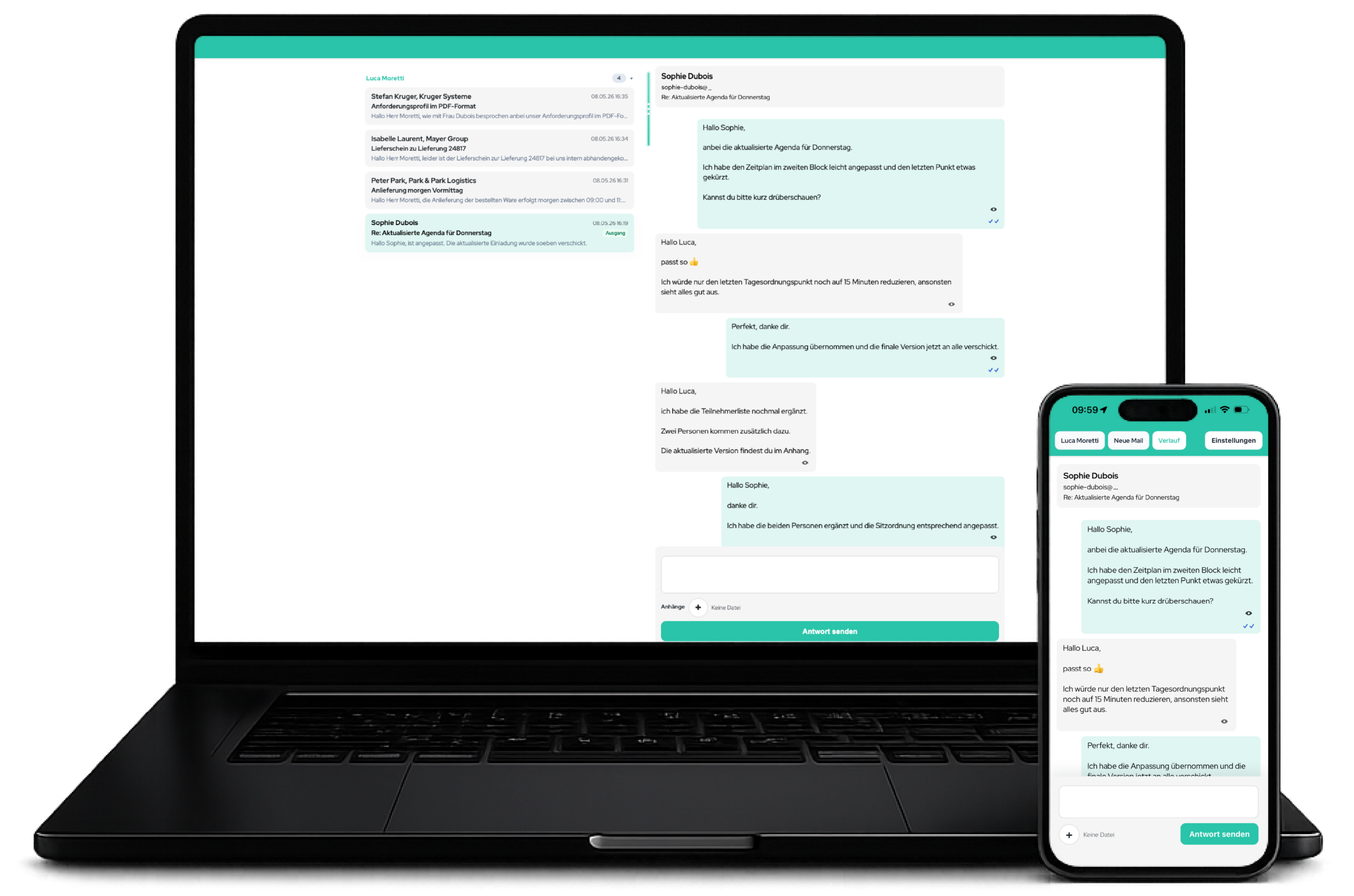
gRDV Messages is a WordPress plugin for professional, consistent and on-brand business communication. You can write and reply to email directly in WordPress and manage it as conversations.
The focus is not on “SMTP”, but on a consistent email presence:
- Consistent templates
- Central signatures
- Consistent font sizes
- Clean display on desktop and smartphones
- On-brand design
- Traceable email conversations
gRDV Messages is particularly suitable for:
- Businesses
- Agencies
- Service providers
- Teams that communicate with customers
- gRDV Booking users
- Websites requiring a professional email presence
Getting started
➔ Install the plugin in WordPress
➔ Activate the plugin
➔ Open the gRDV Messages menu
Under gRDV Messages → Settings:
➔ Enter the sender name
➔ Set the sender email
➔ Optionally set Reply-To
➔ Enter the IMAP credentials
➔ Enter the SMTP credentials
➔ Select the retrieval interval
➔ Synchronise the mailbox
➔ Compose a new email
➔ Send a test message
➔ Check the desktop display
➔ Check the smartphone display
Free: email design
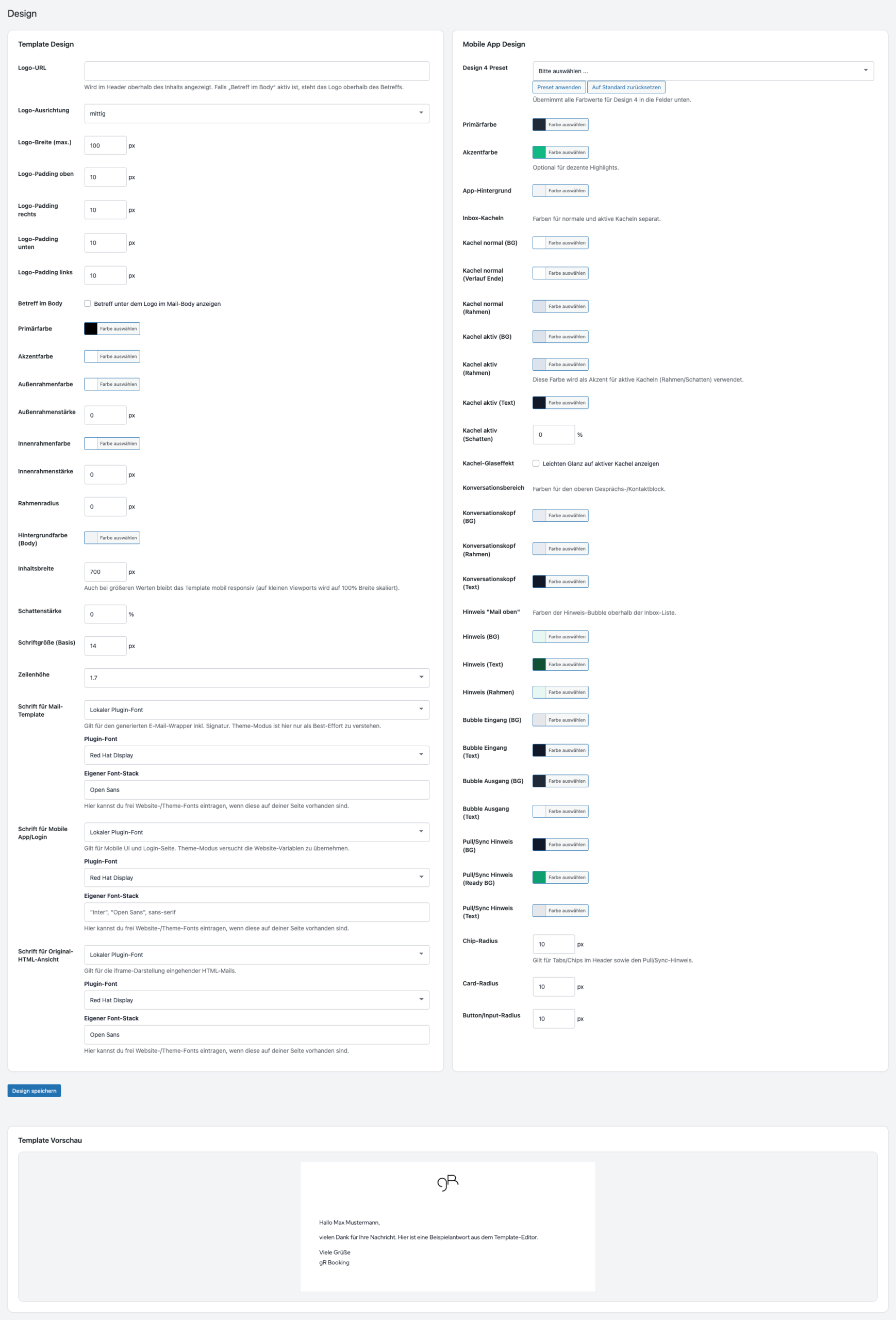
Under gRDV Messages → Design, you define how your email looks.
- Custom HTML email template
- Logo in the email header
- Optional subject line in the email body
- Content card with an accent colour
- Background colour
- Outer and inner borders
- Rounded corners
- Shadow
- Fixed content width
- Responsive display on mobile devices
- Logo URL
- Logo alignment
- Logo width
- Logo spacing
- Primary colour
- Accent colour
- Background colour
- Border colour
- Border width
- Content width
- Font size
- Line height
Typography & display
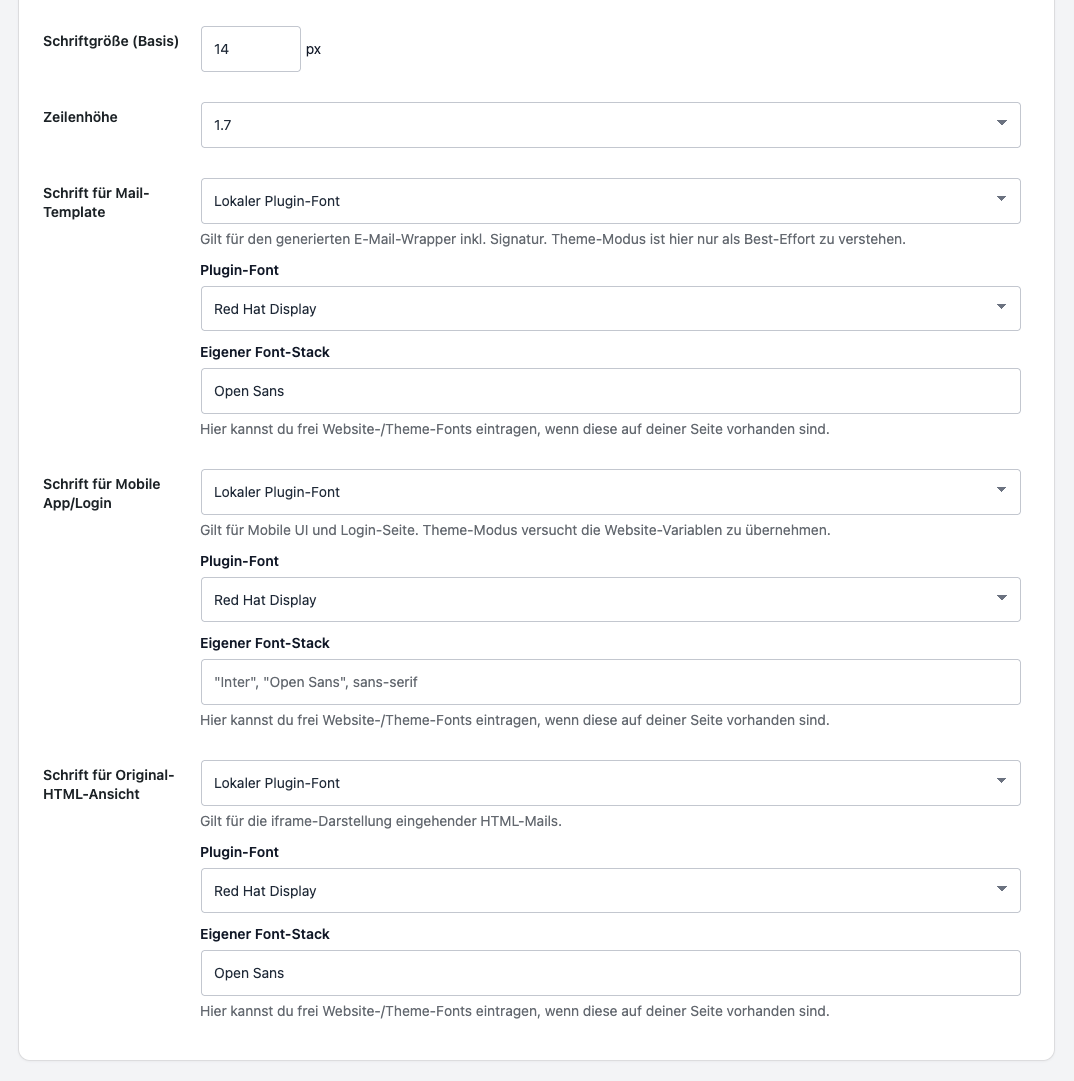
gRDV Messages manages typography centrally, preventing email from looking inconsistent across devices, browsers or email clients.
- Central font control
- Fixed font size
- Fixed line height
- Responsive adjustments
- Separate font contexts for email, the mobile web app and original view
- System font
- Theme font
- Plugin fonts
- Custom font stack
- Roboto
- Open Sans
- Lato
- Montserrat
- Red Hat Display
- Noto Sans
Signatures
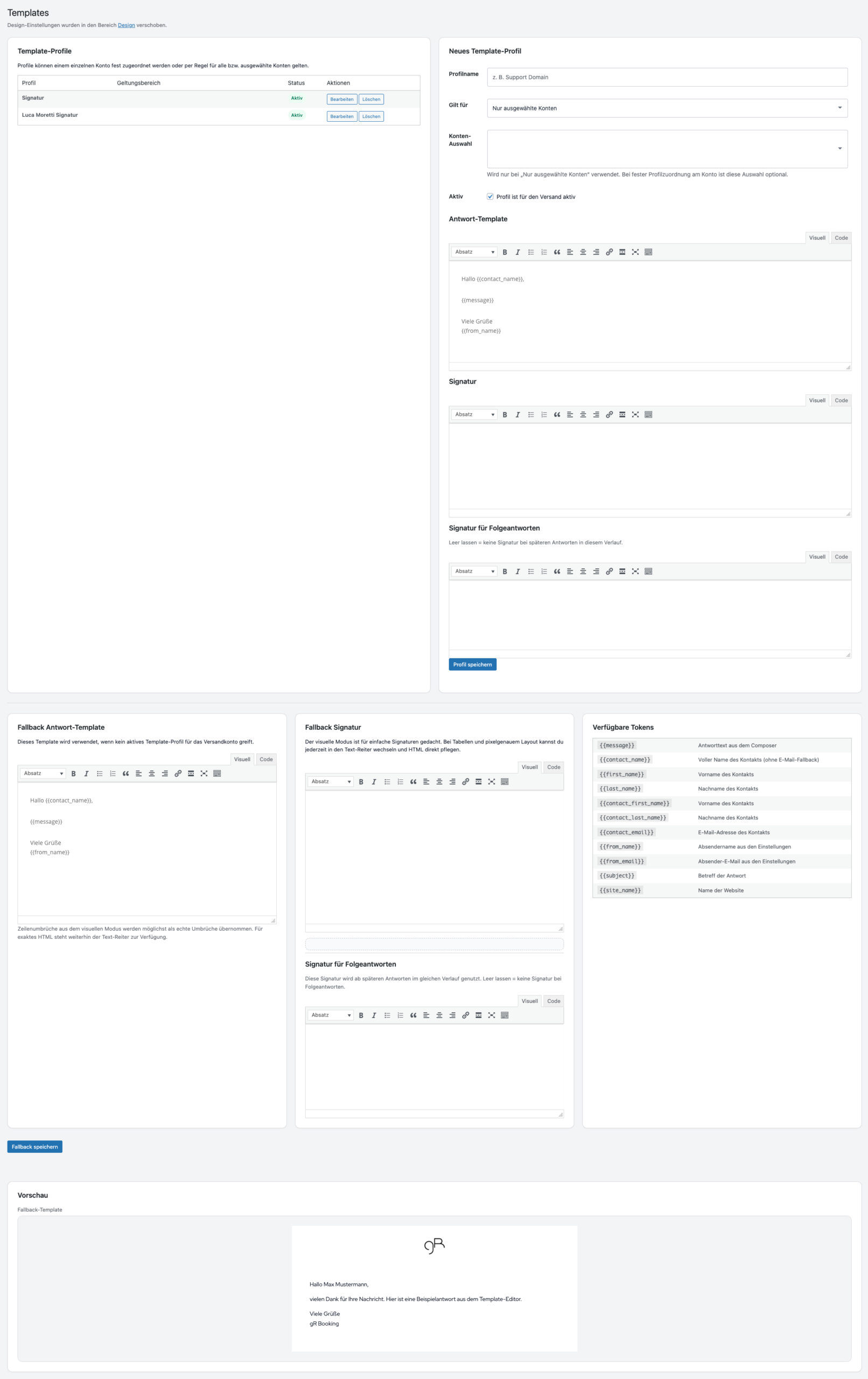
Under gRDV Messages → Templates, you manage signatures centrally in WordPress.
Features:
- Global default signature: Free
- Global subsequent-reply signature: Free
- HTML signatures supported
- Visual editor
- Text/HTML mode
- Signature preview
- Signatures by template profile: Pro
➔ Enter the default signature
➔ Define the subsequent-reply signature
➔ Review the preview
➔ Send a test message
➔ Check the mobile display

Templates
gRDV Messages uses reply templates with placeholders to keep structure and tone consistent.
Features:
- Fallback reply template
- HTML template editor
- Automatic placeholders
- Preview
- One global reply template: Free
- Multiple template profiles and mailbox assignment: Pro
{{message}}

{{contact_name}}

{{first_name}}

{{last_name}}

{{contact_email}}

{{from_name}}

{{from_email}}

{{subject}}

{{site_name}}
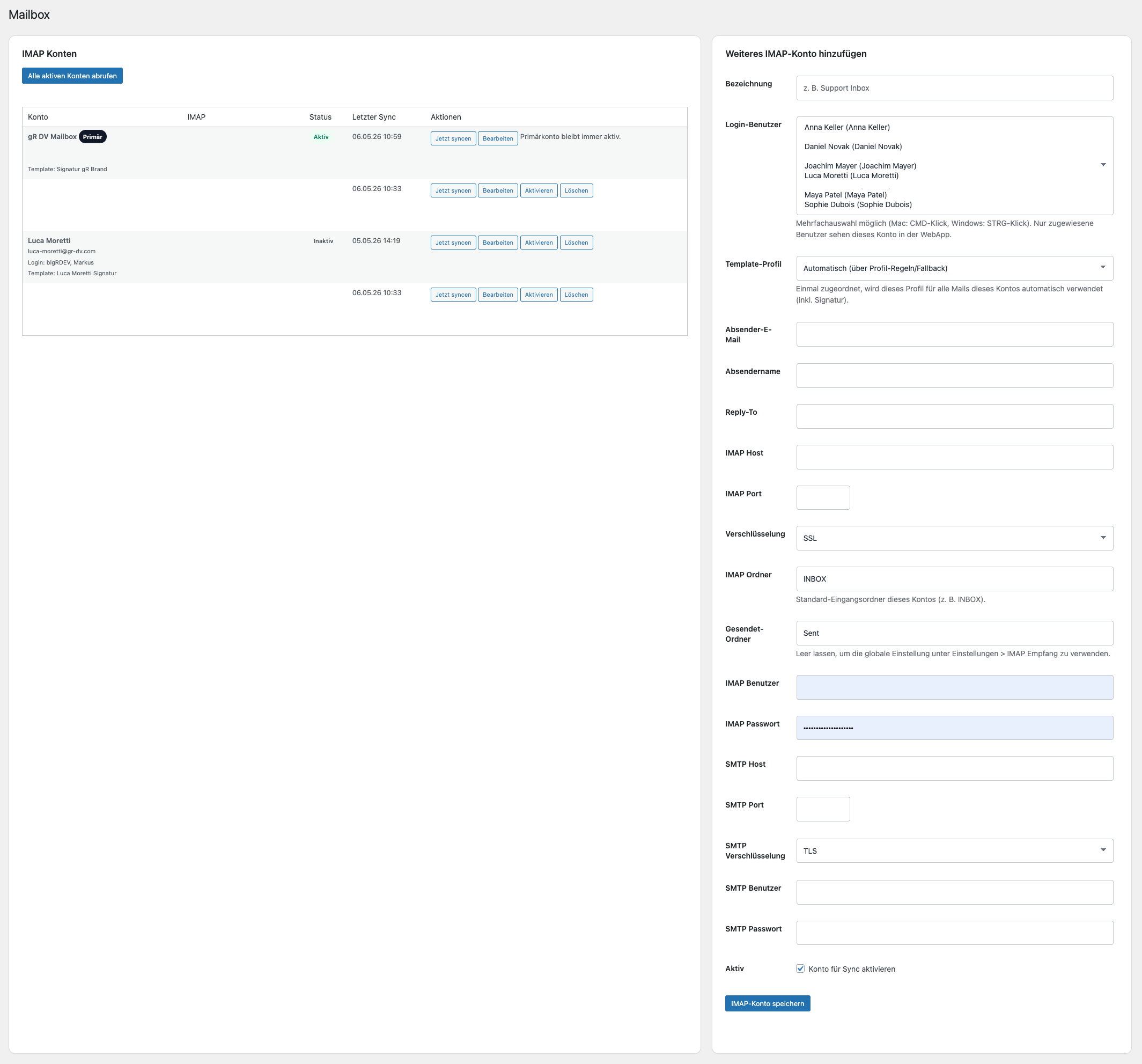
Mailbox
gRDV Messages connects WordPress to existing email accounts. It does not replace an email server; it uses IMAP and SMTP.
- Connect an existing mailbox
- IMAP retrieval
- SMTP sending
- Manage sender details
- Set Reply-To
- Configure the Sent folder
- Synchronise manually or automatically
gRDV Messages Free supports any number of mailboxes, each with its own IMAP, SMTP, sender and Reply-To details. Mailboxes can be assigned to different WordPress users for web-app access.
Pro assigns different template profiles to mailboxes. The number of mailboxes is not restricted to Pro.
New email
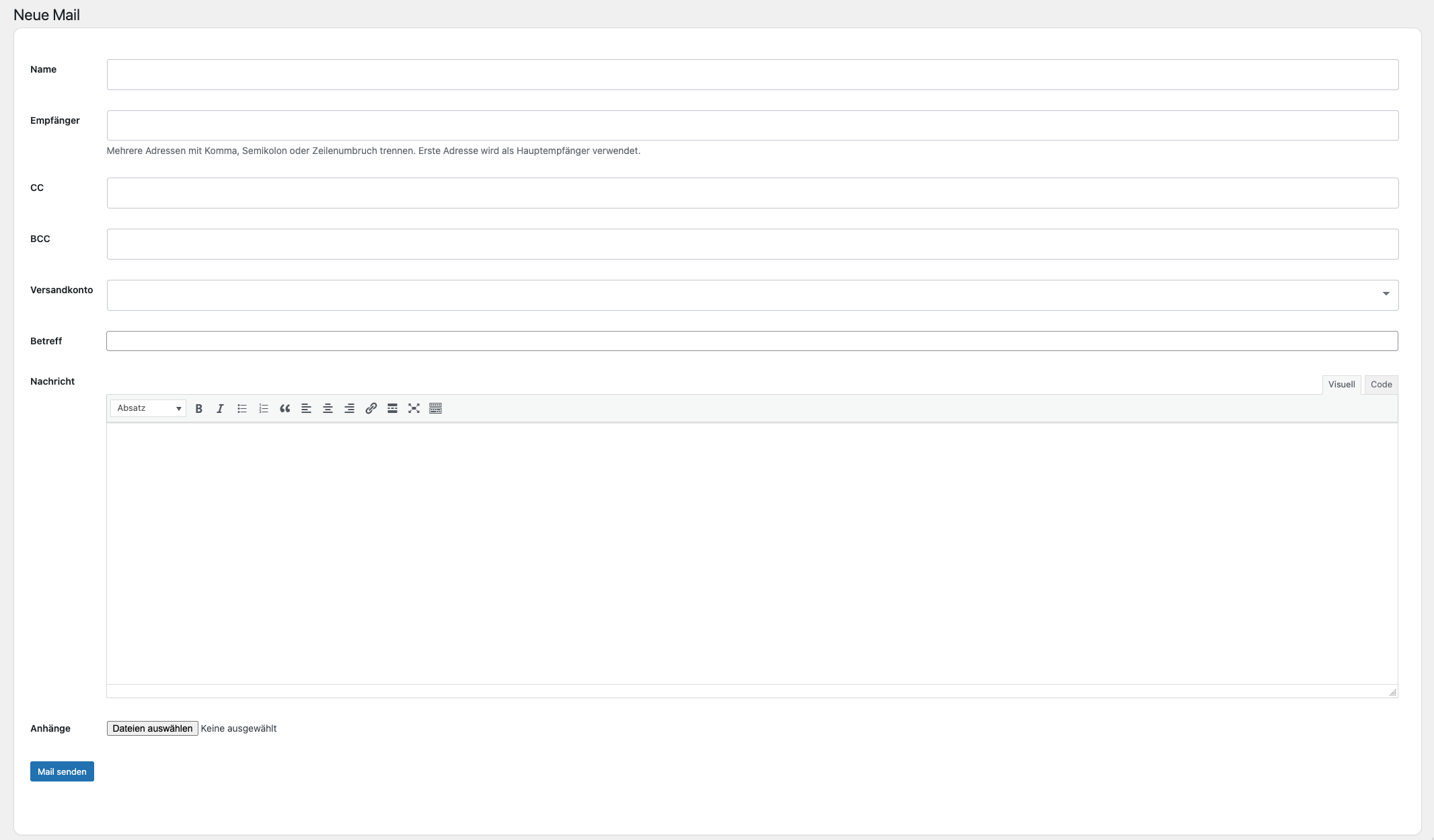
gRDV Messages does more than reply. You can compose new email directly in WordPress.
- Compose a new email
- Enter the recipient
- Add a name
- Use CC
- Use BCC
- Select a sending account
- Write the subject
- Compose the message in the editor
- Add attachments
- Send using the gRDV Messages design
➔ Open gRDV Messages → New Message
➔ Enter the recipient
➔ Select the sending account
➔ Write the message
➔ Add attachments
➔ Send the email
Conversations
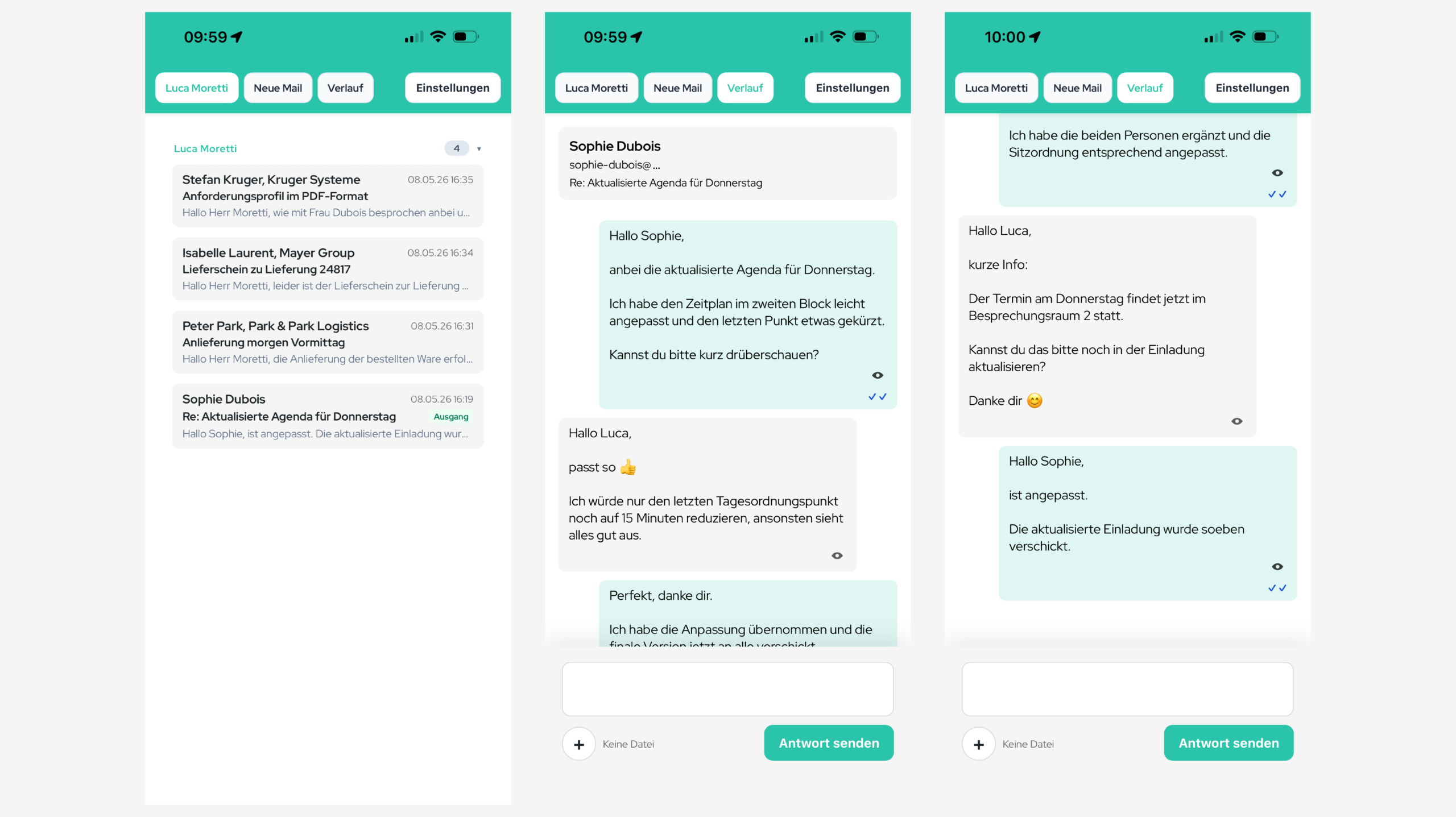
gRDV Messages stores communication as threads, keeping incoming and outgoing messages visible as one conversation.
Features:
- Central inbox
- Conversation overview
- Thread view
- Incoming messages
- Outgoing messages
- Unread messages
- Attachments
- Sending status
- Pro: Delivered, bounced, deferred and failed signals
- Pro: Optional open tracking
- Reply directly in the conversation
- Mark messages as read
- Delete conversations
- Open attachments
- Preview text
- Contact display
- Mailbox filters
- Folder filters

Mobile web app
gRDV Messages includes a mobile web app for reading, replying to and composing email on a smartphone.
Features:
- Mobile inbox
- Mobile thread view
- Compose new email on mobile
- Reply on mobile
- Add attachments on mobile
- Select a sending account
- Private reply in multi-person conversations
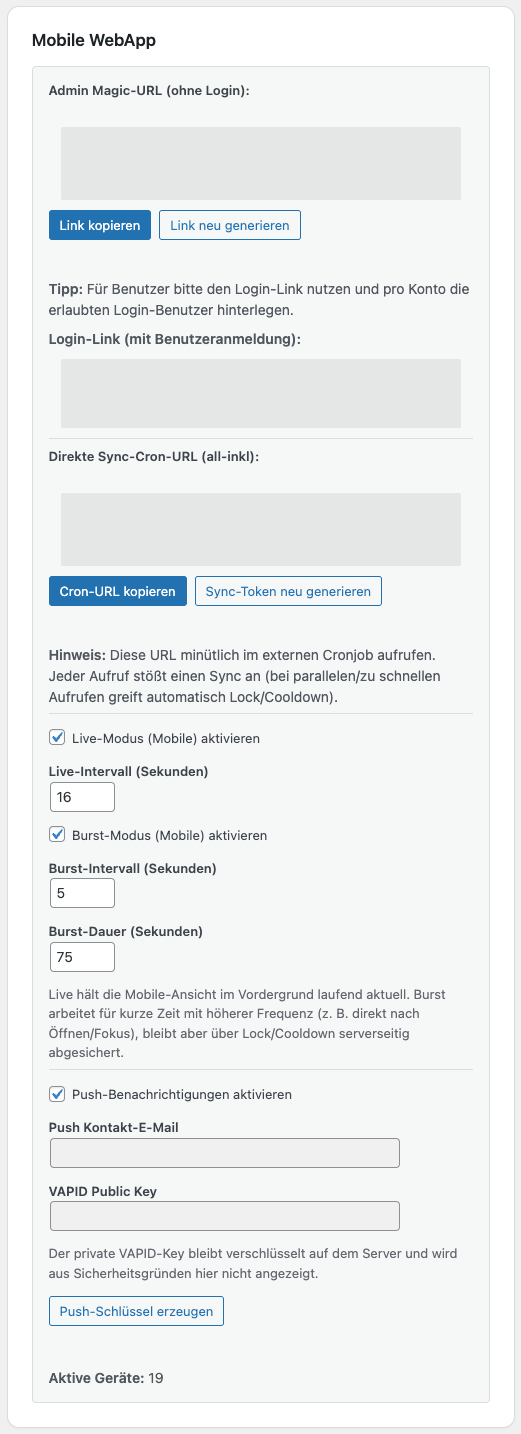
- Magic link
- Login link
- Regenerate token
- Pro: web push and badge synchronisation
- Pro: mobile rich-text composer
- Pro: tracking signals in the conversation
- Pro: scheduled sending
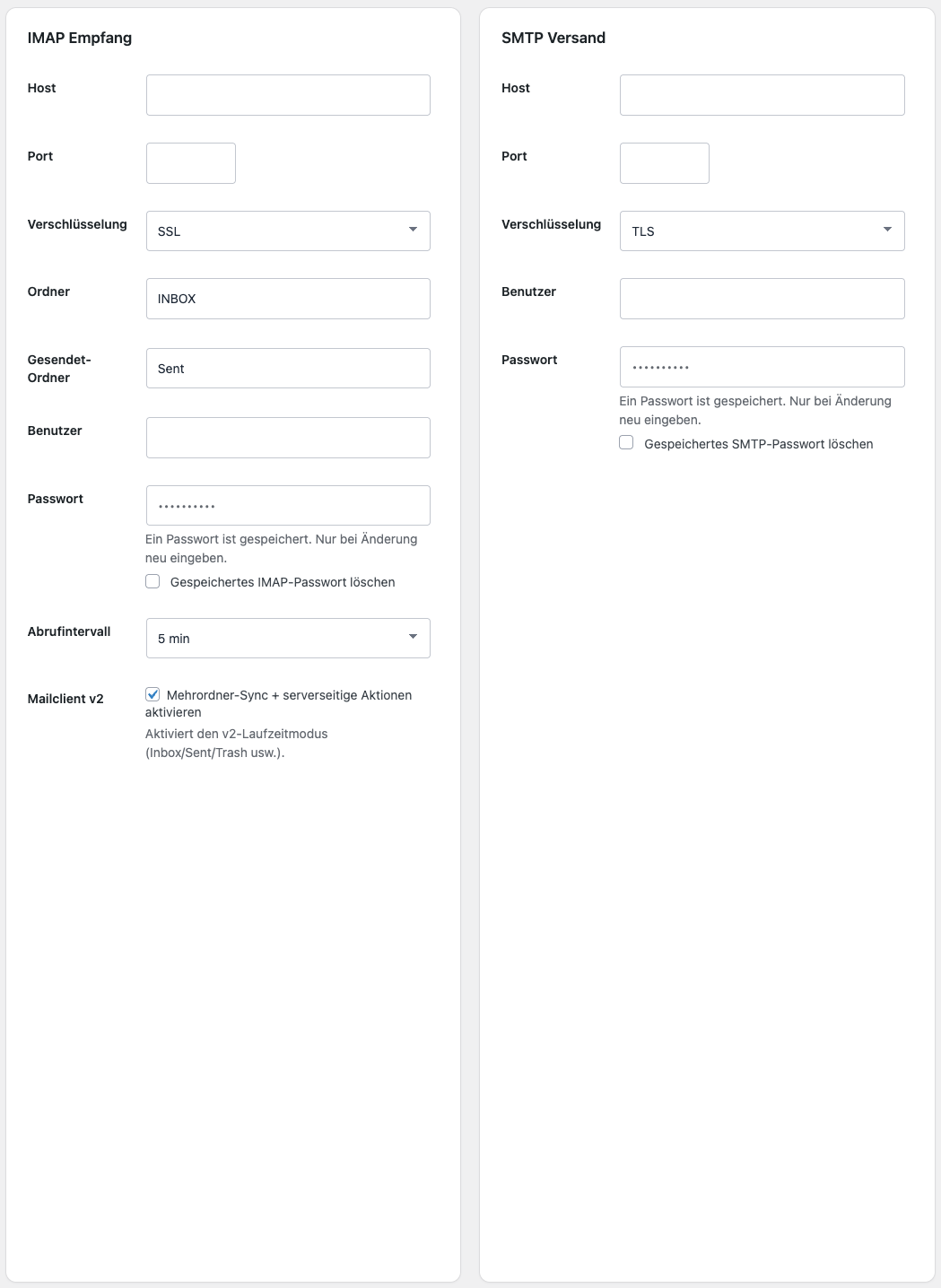
SMTP & IMAP
SMTP and IMAP provide the technical foundation for sending and receiving email.
- Host
- Port
- SSL / TLS / no encryption
- Username
- Password
- Inbox folder
- Sent folder
- Retrieval interval
- Host
- Port
- SSL / TLS / no encryption
- Username
- Password
- Sender name
- Sender address
- Reply-To
Synchronisation
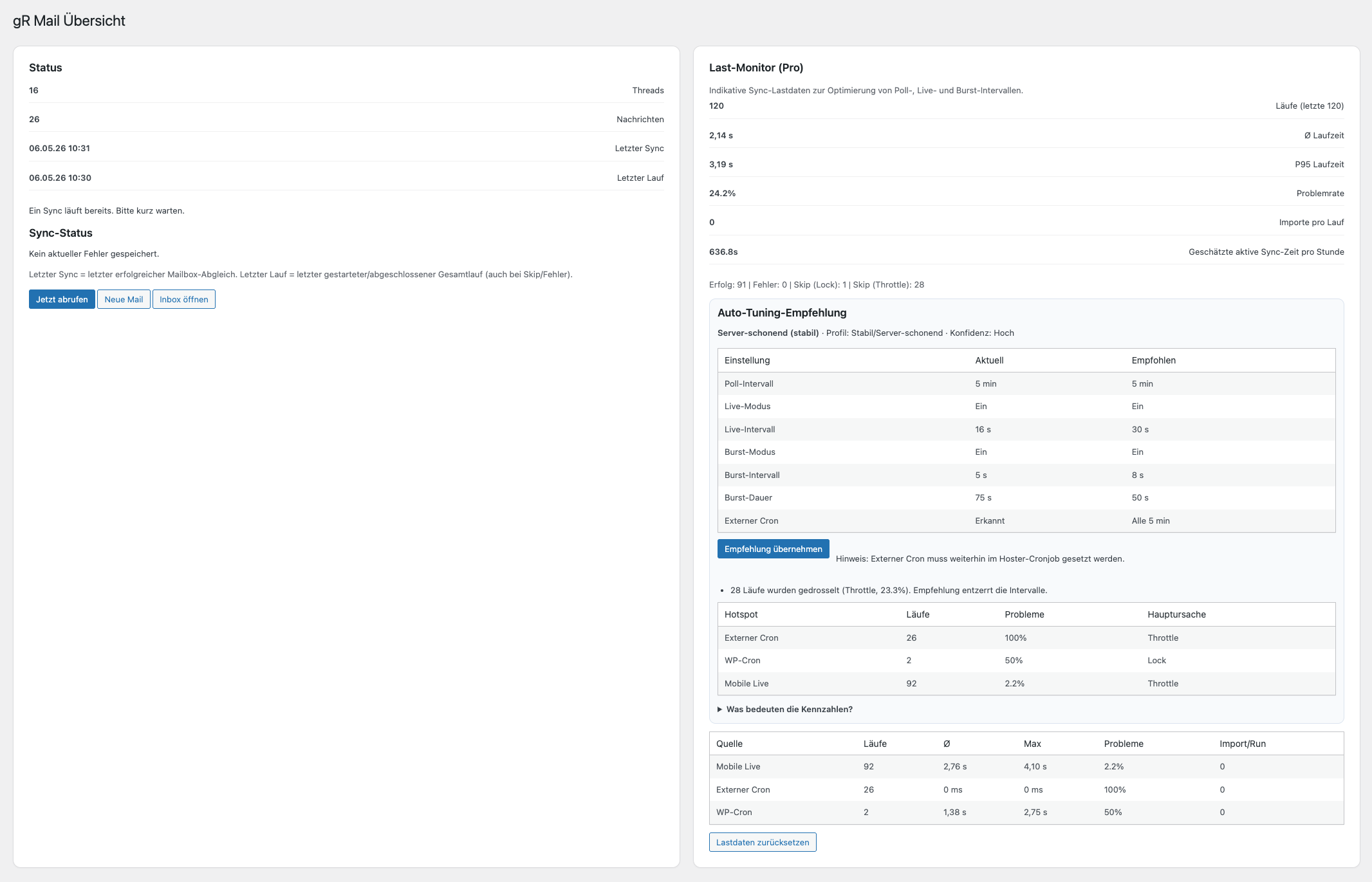
gRDV Messages can retrieve mailboxes regularly and import new messages.
- WordPress Cron sync
- Manual sync
- Sync by account
- Sync all active accounts
- Sync status
- Last retrieval
- Error messages
- Lock/cooldown to prevent parallel sync runs
- External sync cron URL
- Near-live sync
- Burst sync
- Sync load monitor
- Sync recommendations
- Pro: optional IMAP IDLE worker
Email client
- Multi-folder sync
- Folder detection
- Folder visibility in the web app
- Inbox / Sent / Trash / Archive / Spam
- Move
- Trash
- Permanent deletion
- Server-side actions

gRDV Booking integration
gRDV Messages recognises gRDV Booking contexts and can organise booking messages into the appropriate conversations.
- Booking threads
- Customer-recipient recognition
- Booking summaries
- Link to gRDV Booking
- Replies in the appropriate context
- Structured communication around bookings
Pro features
Pro extends the already complete Free email operation with notifications, tracking, scheduled sending, differentiated communication profiles and additional technical tools.
Features:
- Web push and badge synchronisation
- Delivered, bounced, deferred and failed signals
- Optional open tracking based on consent
- Scheduled sending
- Multiple template profiles
- Custom templates and signatures by profile
- Additional and custom web-app design presets
- Rich-text composer in the mobile web app
- Optional IMAP IDLE worker
- Configuration export and import
- Compatible hub and chat integrations
- Support address
- Sales address
- Accounting address
- Multiple locations
- Multiple brands
- Multiple websites
- Team access to selected mailboxes
Privacy & data storage
For its interface, gRDV Messages stores messages, contacts, conversations, account settings and encrypted attachments in the WordPress installation. The original mailboxes remain with the configured email provider. Apart from these email servers, Free does not contact any gRDV service.
Pro also uses the gRDV licence and update service. When web push is enabled, encrypted push notifications are transported through the push service selected by the browser or operating system. With optional open tracking, the recipient’s email client calls a tracking URL on the WordPress installation.
Technical notes
- WordPress 6.2 or later
- PHP 8.1 or later
- PHP IMAP for email retrieval
- OpenSSL for encrypted secrets and push keys
- A working WordPress Cron or system cron is recommended
- WordPress
wp_mail - PHPMailer
- IMAP
- SMTP
- Dedicated database tables
- WordPress Settings API
- WordPress roles/permissions
- Textdomain
grdv-messages
FAQs
Can I compose new email with gRDV Messages?
Can I only reply, or can I manage complete conversations?
Is gRDV Messages an SMTP plugin?
Does gRDV Messages replace my email server?
Where is my email stored?
Does gRDV Messages work on mobile?
Can I manage multiple email addresses?
Can I use different signatures?
Can I use push notifications?
Can gRDV Messages be used in compliance with the GDPR?



gRDV Booking
gRDV Messages
WordPress Plugins © 2026 - gR DV
WordPress Plugins
© 2026 - gR DV