


gRDV Booking
Features
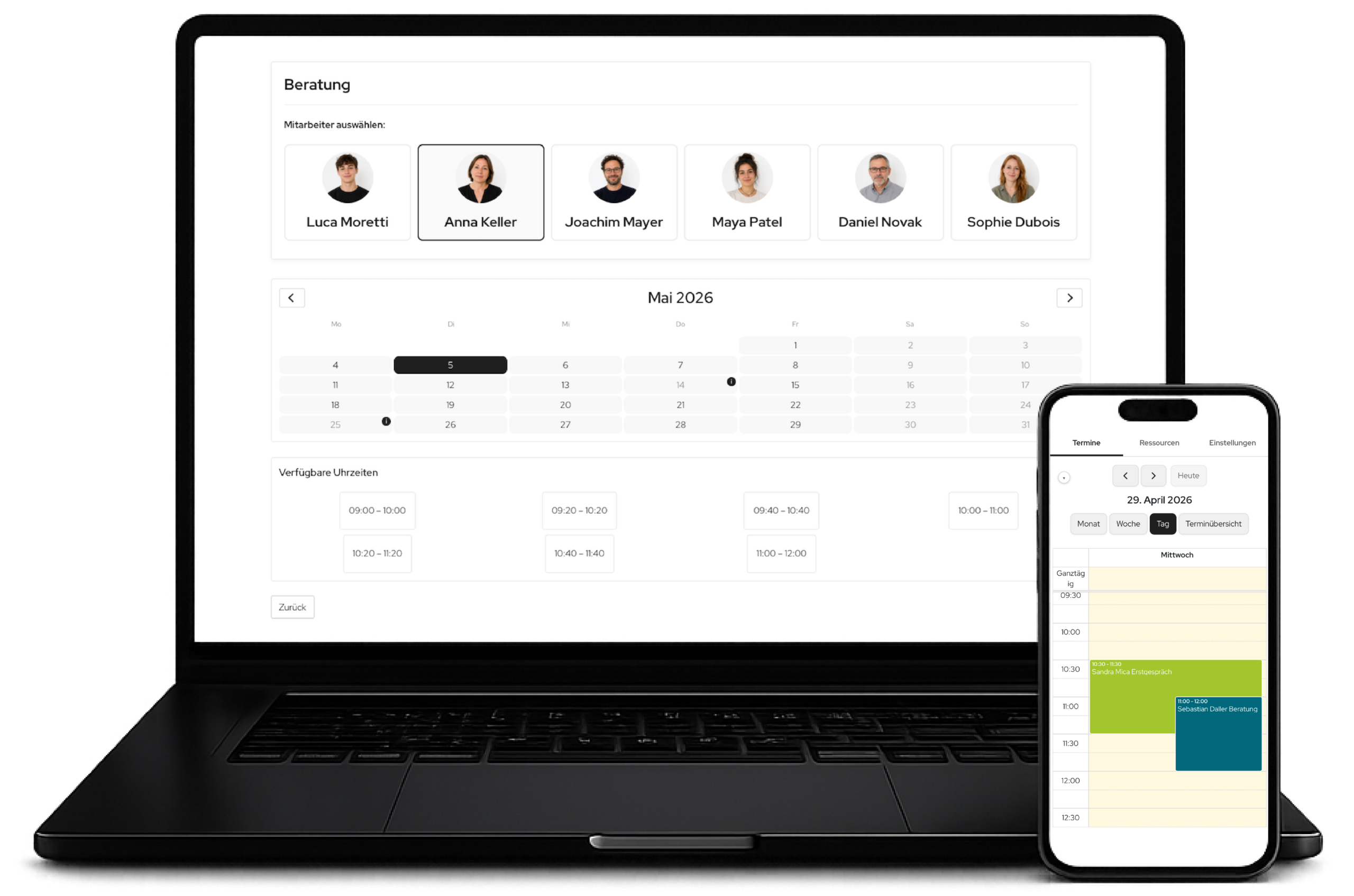
Modern frontend booking form
A guided, multi-step booking form takes visitors from selecting an appointment to confirmation. The interface supports clear decisions: choose an appointment type, select a date and time, enter contact details and complete the booking.
- Multi-step booking journey with clear stages
- Calendar view with available times
- Automatic loading states, status messages and smooth scrolling
- Required name and email fields, with optional company and note
- Dynamic fields for phone appointments and home visits
- Privacy checkbox with a linkable privacy policy
- Custom text for every form step
Flexible appointment types / meeting types
Appointment types represent different services, consultation formats or offering tiers. Each type can have its own duration, description, price, meeting format, resources and booking logic.
- Duration per appointment type
- Price and optional payment requirement
- Active/inactive setting for the frontend
- Description with editor content
- Meeting formats: video, phone, on site or at the customer’s location
- Location/address or video-conference link per appointment type
- Sortable display order
- Deep-link and shortcode focus for individual appointment types
Resources, staff, teams and departments
gRDV Booking can assign appointments to specific people, teams, departments or other resources. This makes it suitable not only for individual providers, but also for teams, practices, consultancies and service-focused businesses.
- Resources as staff members, teams, departments or custom types
- Profile image, colour, email address and additional information per resource
- Link resources to WordPress users for role-based calendar access
- Teams and departments with assigned staff
- Custom frontend labels such as “Staff member”, “Team”, “Department” or “Device”
- Manual customer selection or automatic assignment
Intelligent availability logic
The booking logic combines global office hours, individual resource schedules, existing bookings, absences, lead time, buffer time and external calendar data. Available slots are calculated in real time and in context.
- Global office hours by weekday
- Multiple time windows per day, for example with a lunch break
- Individual working hours per resource
- Absences and leave per resource
- Configurable booking intervals
- Maximum advance booking period in days
- Earliest appointment start controlled by lead time
- Buffer time after appointments
- Final real-time check when submitting a booking
- Weekend display based on actual working hours
Calendars, ICS, Webcal and external blockers
External calendars can be connected through ICS/Webcal and used to block availability. gRDV Booking also provides its own ICS feeds so bookings can be added to external calendars.
- Global external ICS/Webcal feeds
- Resource-specific ICS URLs
- Support for Google Calendar, Apple Calendar and Outlook through ICS/Webcal
- All-day external events as blocked days
- Time-specific busy intervals as occupied periods
- Visible external blockers in admin and mobile calendars
- ICS cache for fast rendering
- Manual ICS cache clearing
- Global booking feed
- Separate ICS feeds per resource
- Webcal links for calendar subscriptions
Internal admin calendar
The internal calendar turns gRDV Booking into an operational planning tool. Administrators can view bookings, resources, blockers, external calendar data and details in one central calendar interface.
- Month, week, day and list views
- Colour-coded resource filters
- Appointment details in a modal
- Manual bookings directly in the calendar
- All-day blockers
- Appointment rescheduling and editing
- Cancellation with an optional reason
- Selectable notifications for the customer, administrator and resource
- Contact search using saved contacts
- Display join link, meeting link, description, language and notes
Mobile calendar / app experience
The mobile view brings essential calendar features to a smartphone. Using a magic URL or login, the calendar can be used like an app and added to the home screen.
- Mobile calendar view with FullCalendar
- PWA manifest, app icons and theme colour
- Access via magic URL or WordPress login
- Administrator view for all resources
- Staff view for linked resources
- Mobile appointment details
- Call buttons for customer contacts
- Optional second calling method, such as SIP or Callto
- Mobile management of working hours and absences
- Mobile resource and meeting-type management for administrators
- Compose mobile email for existing appointments
- External-blocker legend and compact landscape optimisation
Manual bookings and internal blockers
Alongside website bookings, appointments can also be created internally. This is ideal for phone enquiries, personal arrangements, internal reservations or unavailable periods.
- Manual appointment creation in the admin calendar
- Choose an appointment type or custom title
- Customer data, company, phone, email and note
- Resource assignment
- Meeting format, location and meeting link
- All-day blocker
- Confirmation email language
- Optional notification controls
Automatic resource assignment
gRDV Booking can automatically select an available resource for a booking. Alternatively, customers can select a resource themselves when this suits the workflow.
- Automatically select the next available resource
- Manual selection in the frontend
- Resource selection with profile image, name and additional information
- Support for teams and departments through membership logic
- Resource-specific availability and external calendar data
- Colour assignment in the calendar
Email and notifications
Communication around an appointment is generated automatically and sent to the appropriate recipients. This includes customer confirmations, internal notifications, resource email, rescheduling, cancellations and manual messages.
- Booking confirmation for customers
- Administrator notification
- Notification for the resource/staff member
- Change and rescheduling email
- Cancellation email with an optional reason
- Manual email for existing appointments
- Logo, signature and HTML templates
- Email content including appointment type, resource, location, phone, join link, ICS link and management link
- Fallback through WordPress email
- Optional gRDV Messages integration with context/threading
Join links and online meetings
For online appointments, gRDV Booking generates a dedicated join link that redirects to the actual meeting link. Its presentation automatically adapts to common providers.
- Protected join links per booking
- Valid from ten minutes before the appointment starts
- Valid until 30 minutes after the appointment ends
- Automatic provider detection for Microsoft Teams, Google Meet, Zoom, WhatsApp and generic online links
- Professional guidance for early or expired access
- Join link in email and ICS descriptions
Appointment management and cancellation links
Customers receive a personal management link for viewing their appointment and cancelling future appointments. The page is language-aware and designed for straightforward use.
- Personal management link per booking
- Virtual appointment-management page
- Cancellation with an optional reason
- Language context from the booking or URL
- Cancellation notifications for the customer, administrator and resource
- Past appointments are shown as no longer editable
Stripe payments
Paid appointments can be processed through Stripe Checkout. The booking is finalised and confirmed after successful payment.
- Test and live modes
- Separate test and live keys
- Webhook support
- Configurable currency
- Tax calculation using a tax rate
- Gross/net options in the payment flow
- Payment status after returning to the website
- Terms and withdrawal links in the payment modal
- Payment requirement configurable per appointment type
Multilingual support and WPML
gRDV Booking is designed for multilingual websites. Booking language, email language, form text and translatable content are respected throughout the booking journey.
- WordPress text domain and language files
- English language files included
- Backend language based on the user locale
- Booking language per appointment
- WPML support for form text
- WPML support for appointment types, resource information and URLs
- Language selection for manual bookings
- Language context for email and management pages
Privacy and data control
The plugin includes several features for deliberate data processing and controlled retention. Operators can define how long booking data is stored and what happens to it afterwards.
- Privacy checkbox in the booking form
- Configurable privacy-policy URL
- Token-based management links
- Private ICS feed URLs with access tokens
- Retention mode: off, anonymise or delete
- Retention period in days
- Manual cleanup by button
- Optional removal of plugin tables on uninstall
- Automatic cleanup of join and ICS tokens
Design, branding and customisation
The frontend can be visually adapted to the website and brand. Alongside layouts and colours, gRDV Booking supports local plugin fonts, theme fonts and custom CSS.
- Layouts: Classic, Modern, Compact
- Primary, contrast, background, text, muted, danger and border colours
- Configurable corner radius
- Plugin fonts: Roboto, Open Sans, Lato, Montserrat, Red Hat Display and Noto Sans
- Theme font, system font or custom font stack
- Custom CSS
- Pop-up button CSS
- Overlay colour, intensity and blur for pop-ups
- White-label/powered-by removal with an eligible licence
Shortcodes, pop-ups and deep links
gRDV Booking can be integrated flexibly into pages, landing pages, buttons and campaigns. The booking journey can be displayed inline or opened as a modal.
- Shortcode [gR booking]
- Shortcode focus on appointment type:
type - Shortcode focus on resource:
resource - Inline integration
- Pop-up integration
- Pop-up trigger as a button, automatically or without a trigger
- Configurable button text and modal title
- Automatic delay for automatic pop-ups
- Deep links through the URL parameters
typeandresource - Return after Stripe payment with automatic status display
Contact and customer management
gRDV Booking stores booking contacts and makes them reusable in the admin calendar. This speeds up manual bookings and internal follow-up.
- Search contacts by name, company, email or phone
- Automatically save/update contacts from bookings
- Backend contact list
- VCF import
- VCF export
- Delete individual or multiple contacts
- Address, company, phone and email as contact data



gRDV Booking
gRDV Messages
WordPress Plugins © 2026 - gR DV
WordPress Plugins
© 2026 - gR DV